
First off, what is Focused Inbox? Focused Inbox helps you focus on the emails that matter most to you. It separates your inbox into two tabs-Focused and Other. Your most important emails are on theFocused tab while the rest remain easily accessible-but out of the way-on the Other tab.
No to turn it off:
Outlook 2016 for Mac
-
On the Organize tab, select Focused inbox.
The Focused and Other tabs will disappear from the top of your mailbox.
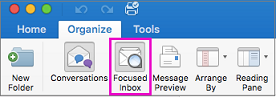
Note: If you don't see the button, your version of Outlook might not include this feature. We often release new features to members of the Insiders program first. After that, we release them via updates to your Office programs. You can always check for updates by selecting Help > Check For Updates.
Comments
0 comments
Please sign in to leave a comment.