
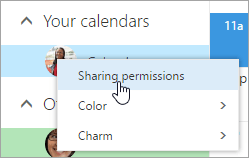
You can change the permissions you’ve set for a calendar, or stop sharing the calendar completely, by right-clicking the calendar name under Your calendars.
-
At the top of the page, select the app launcher
 , and select Calendar.
 -
Under Your calendars, right-click the calendar for which you want to update sharing settings, and select Sharing permissions.
-
Find the person whose permissions you want to change and either choose a new level of permissions or select Remove
 to stop sharing your calendar with that person.
When you remove a person from the list of people with whom you've shared your calendar, the URL that was sent to that person stops working. If the user is also within your organization, the calendar is removed from their list of calendars.
Comments
0 comments
Please sign in to leave a comment.